An enterprise AI platform that turns hundreds of unstructured PDFs into structured, trustworthy data. I was handpicked and flown to Dubai to work onsite with UnifyApps' C-suite, with three weeks to take it from ambiguity to a live POC, against a $500K ARR opportunity.
RoleSole Product Designer
Timeline3 weeks · design to POC
TeamCPO, VP & AVP Product, PM, CTO
ContextOnsite, Dubai · C-suite
PlatformWeb · Enterprise AI
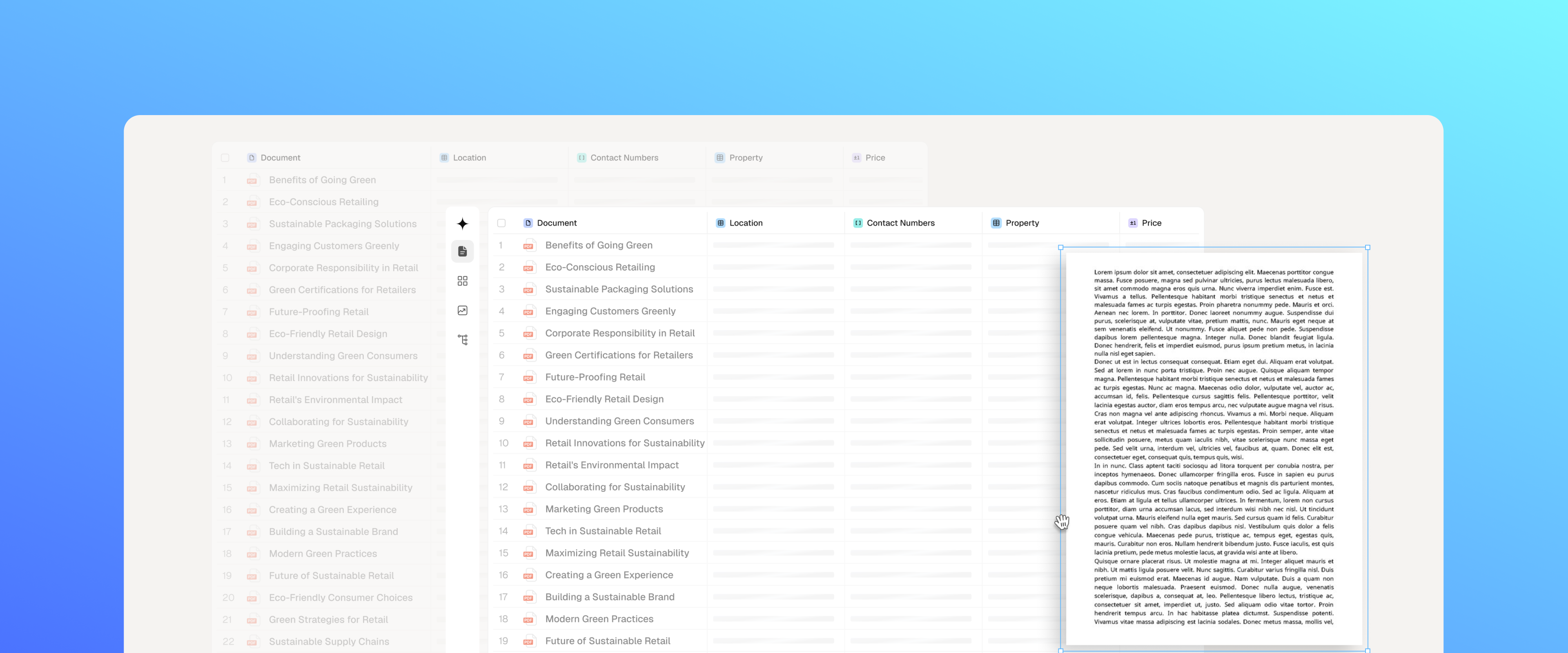
A distributor was sitting on hundreds of dense technical documents. Everything the business needed to list and sell its products, buried in PDFs that only a person could read. Someone had to open each file, find the right fields, and retype them by hand before a single product could go live.
That doesn't scale. It doesn't even hold steady. It just gets slower as the pile grows.
I had three weeks to design an AI system that could read those documents instead. The obvious challenge was making the extraction accurate. That turned out to be the easy part. The real question was harder to see coming: once the AI hands you a value, why would you believe it?
Before · manual
Weeks per batch
Read, retype, verify. Every field, every document, by hand.
After · AI extraction
Minutes per batch
Upload, extract, review, publish. Tools in this category report 80–90% less processing time.
The deal on the table was worth $500K. The bigger decision was what I was actually building.
I could design a tool that read this one company's documents well. That would close the deal in front of us.
Or I could design something that didn't care whose documents it was reading at all, and sell the same engine into the next company, and the one after that.
Those are two different products wearing the same UI. I chose the second one, which meant every decision from here on had to hold up for a client I hadn't met yet, reading a document type I hadn't seen yet.
There was no research phase. So I built one out of what was already in the room.
I sat with the people who understood the bet: product leadership, engineering, the people who'd tried to sell something like this before. I got under the hood of what the AI could actually promise. And I watched how competitors handled the same problem, closely.
One detail changed the whole trajectory of the project. The model tagged every value with a citation and a source, reliably. It also produced confidence scores and reasoning, but those weren't reliable enough to show anyone. I noted it and moved on. It would turn out to be the single most important fact I learned that week.
Every competitor I looked at had solved extraction. None of them had solved the moment right after, when a person has to decide whether to believe what's on screen.
What happens when the AI is confidently wrong?
Once I asked that question, I couldn't design anything the same way again. A tool that's right 95% of the time still fails completely if nobody can tell the good 95% from the bad 5%.
So the brief quietly changed. I wasn't building an extraction tool anymore. I was building the thing that stands between an AI's guess and someone clicking Import.
Three ideas came out of that and shaped everything after:
01
Evidence on demand
Let people check any value. Don't drown every value in proof.
02
Design the failure
An AI product is defined by how it behaves when it's wrong.
03
Breadth and depth
Scan hundreds of documents, or inspect one nested value. Never force the choice.
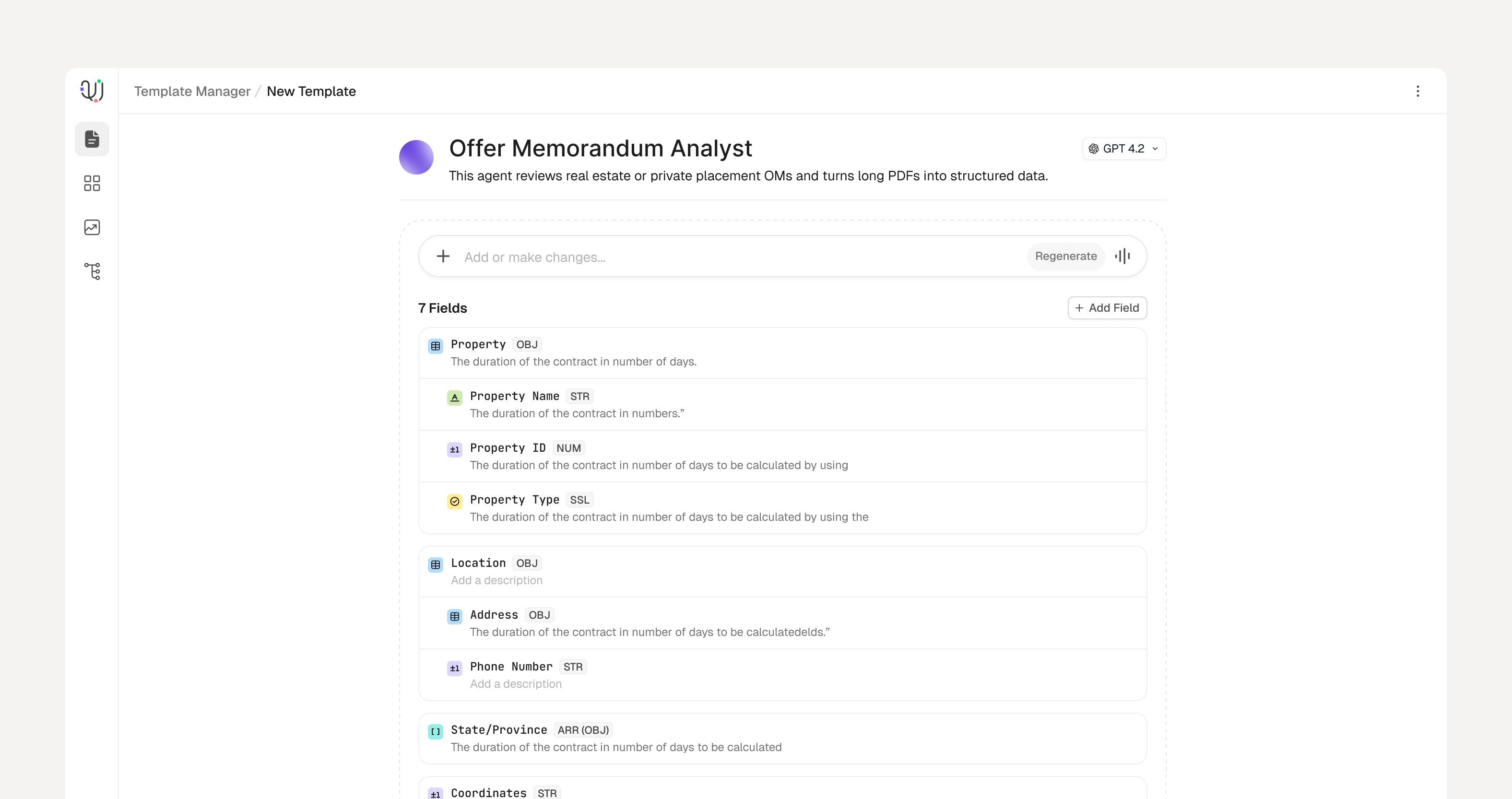
The first screen a user sees can't ask them to already understand the system.
Setting up a schema by hand meant knowing exactly how the data was structured, dozens of nested fields deep. That's a wall for anyone new, and it guarantees the product feels like work before it's done anything for you.
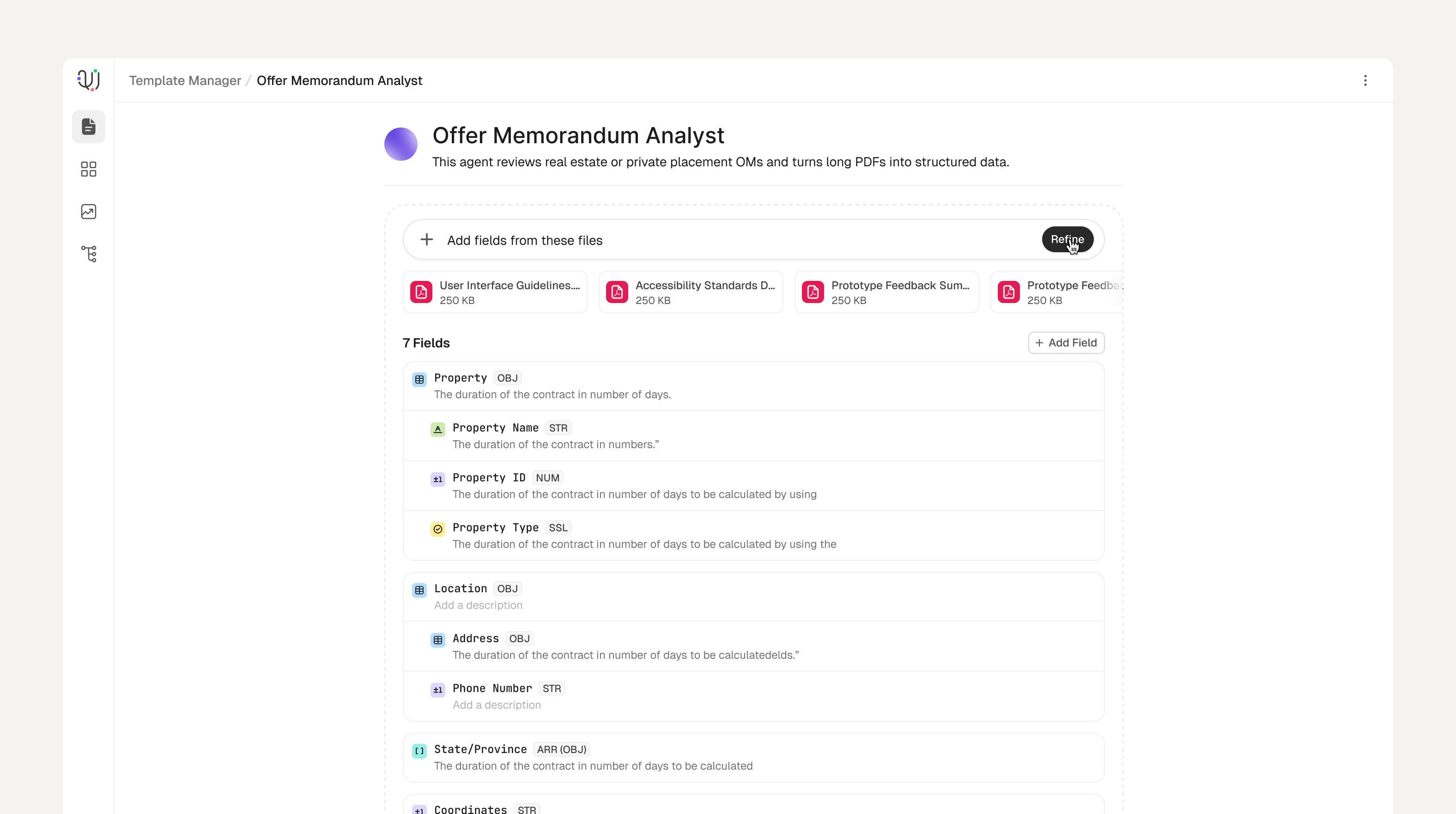
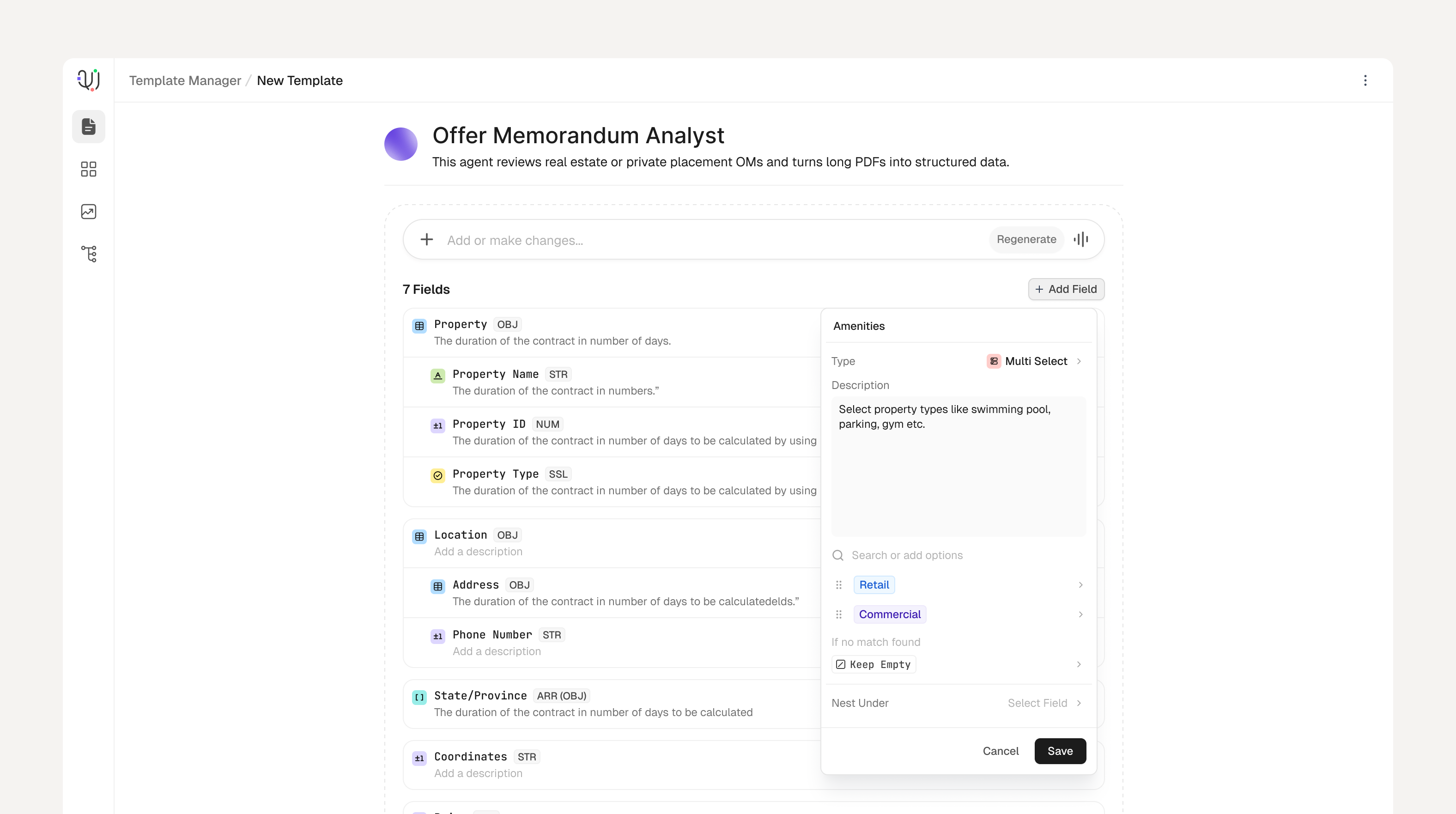
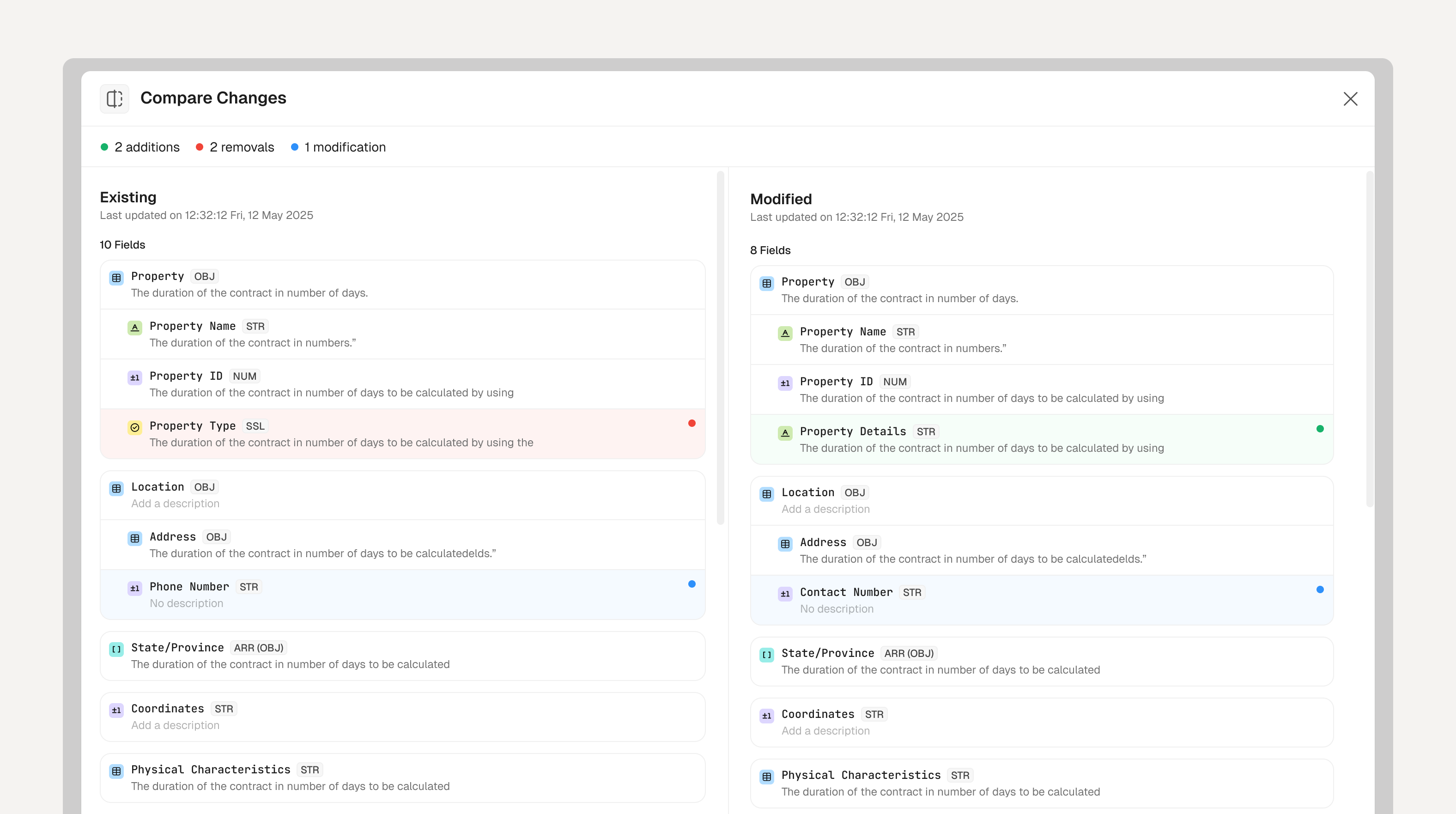
So the AI drafts the schema itself, straight from your documents. It lands as a visible draft, a dashed border around the whole surface, so nothing feels locked in. From there you talk to it in plain language, and before anything commits, you see exactly what changed. The one cost is an extra step to review. That's a fair trade for never silently shipping the wrong schema.
The dashed border says: this is a draft. Nothing is final until you accept it.Refine in plain language. The schema updates. Power users can still add fields by hand.Adding a field opens a small focused popover, right where you are.Before anything commits: every addition, removal, and edit, side by side.
Scanning a thousand documents and inspecting one are not the same job.
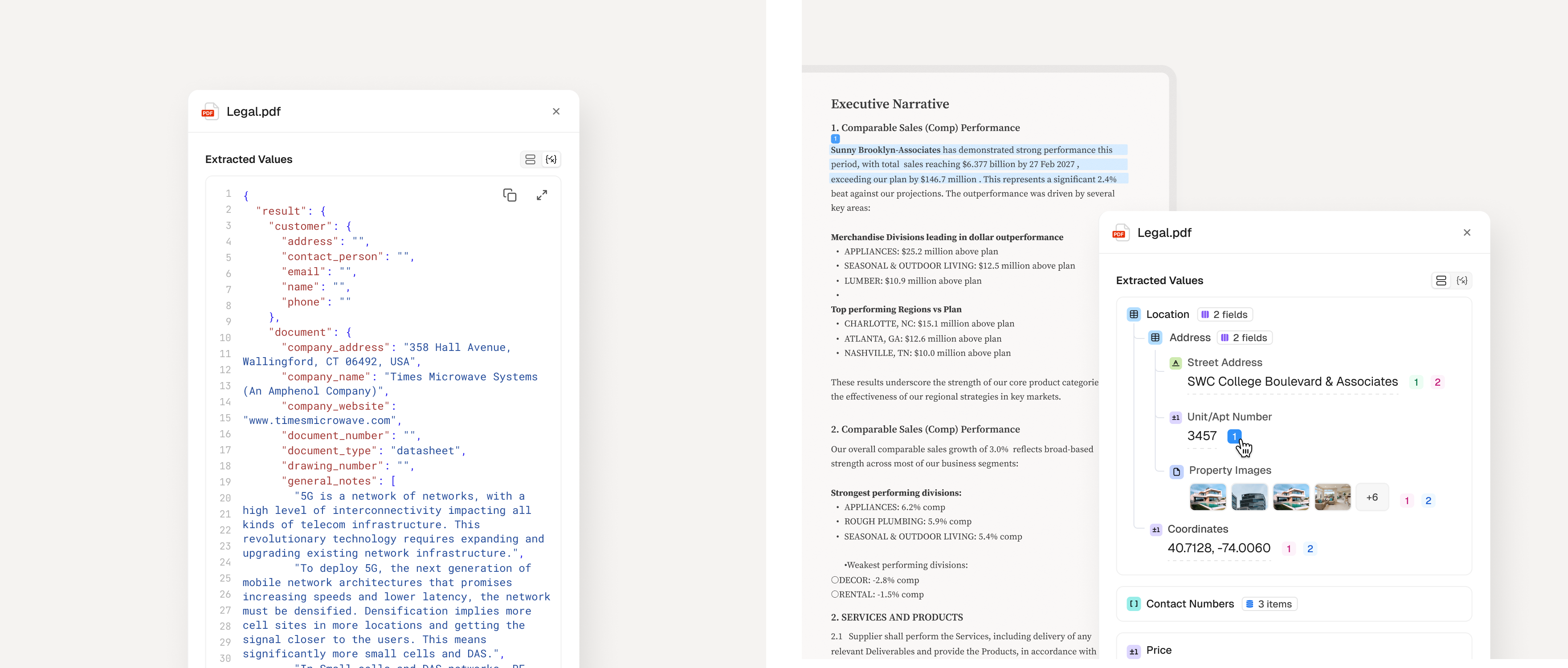
The data nested deep, objects inside objects, arrays inside those. A flat table couldn't hold that shape. A pure tree view could, but nobody wants to expand five levels of nesting five hundred times in a row.
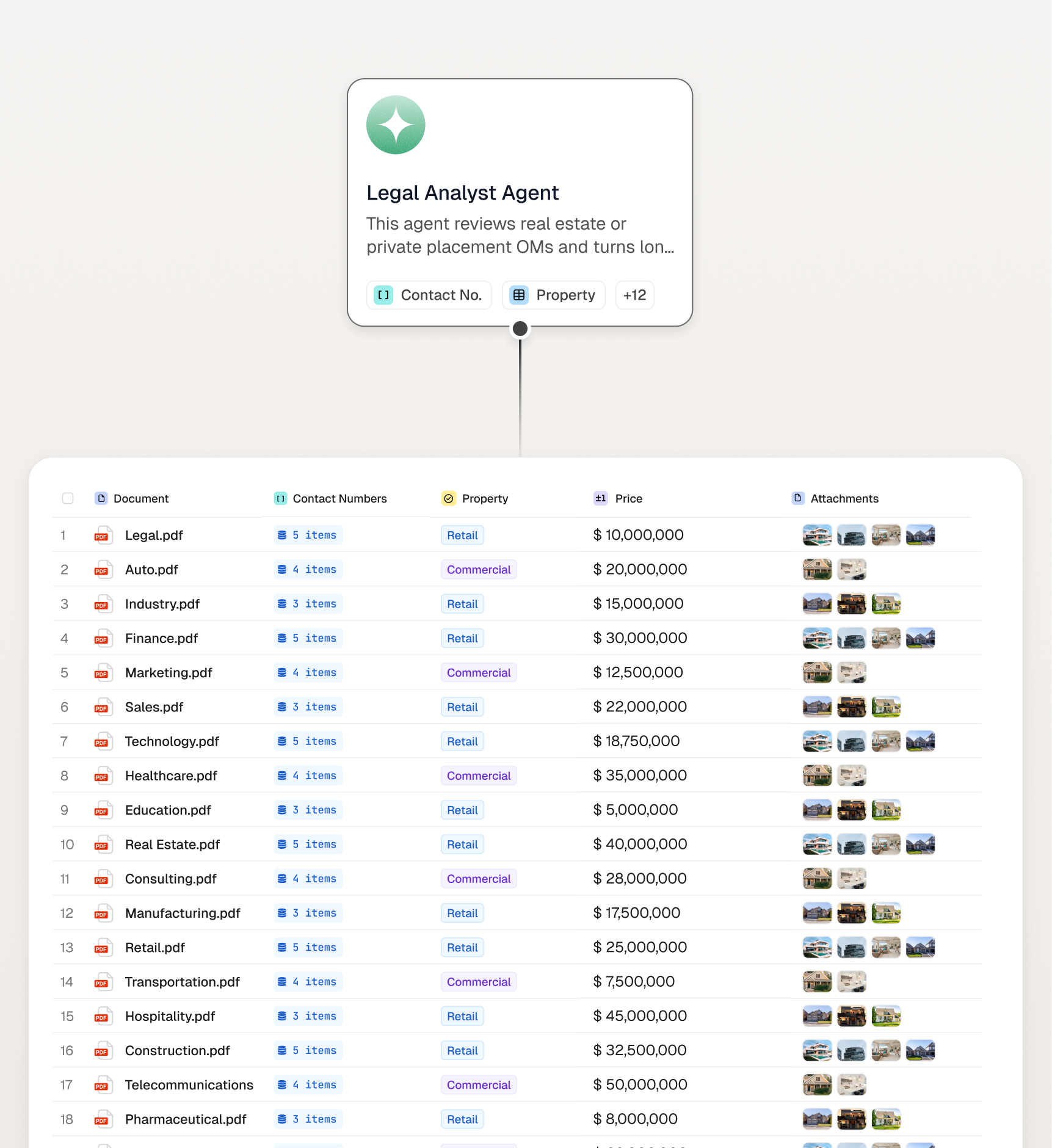
I stopped trying to make one view do two jobs. A flat table for scanning across documents. An expandable tree for going deep on one. Full nesting is a click away instead of sitting on the surface, because scanning across files was what people needed to do most of the time.
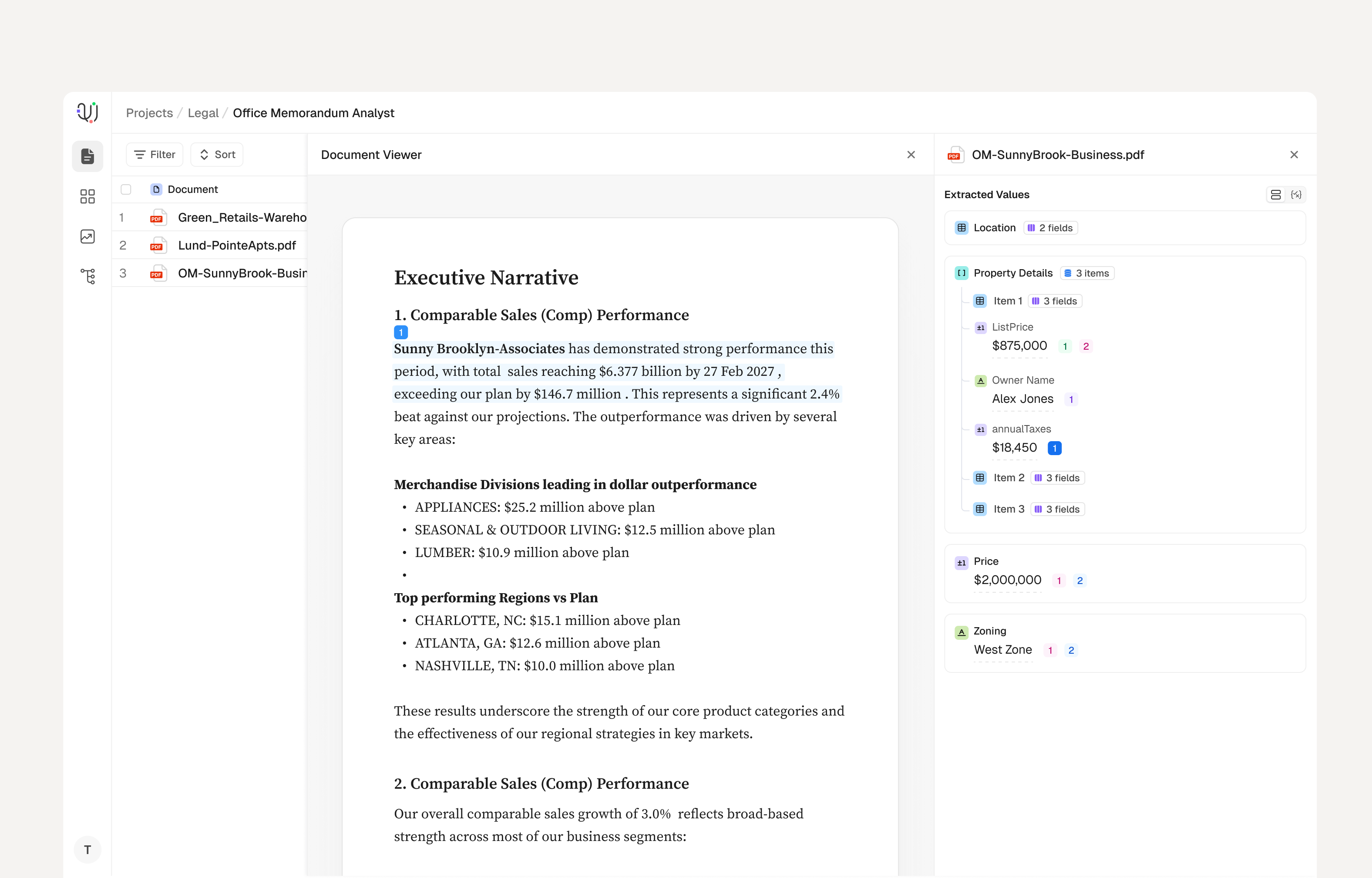
Breadth: one row per document, scannable across hundreds of files.Depth: the source document beside the expandable value tree.
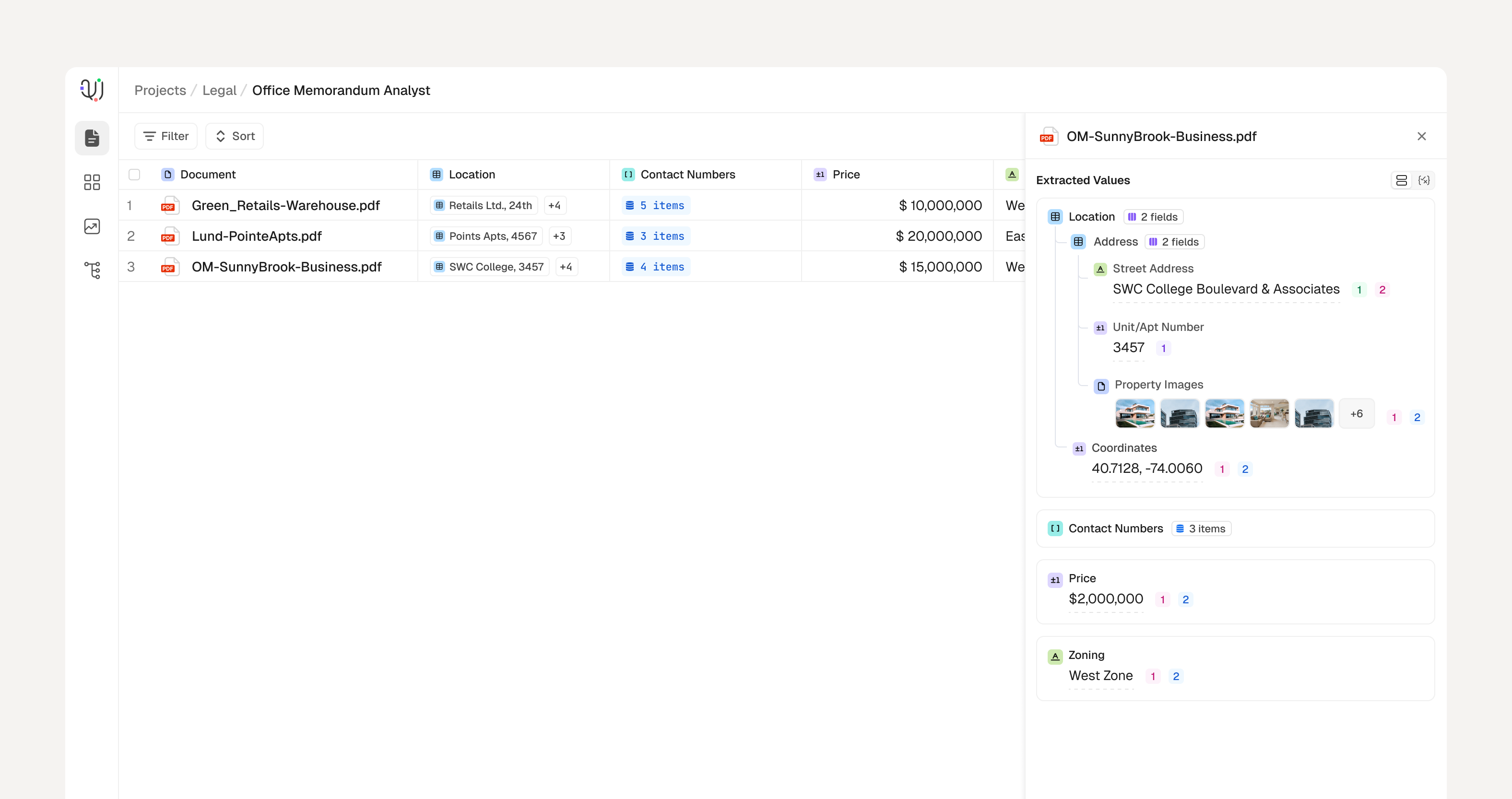
The tree itself was the hardest layout problem in the whole project. Nested objects, arrays, image thumbnails, coordinates, a source on every value, all coexisting in one hierarchy that still had to feel calm rather than dense. It went through more iterations than anything else I built here.
The tree at full depth. Objects nest, arrays expand inline, images render as thumbnails, every value keeps its source. Still legible.
Trust turned out to be quiet, not loud.
My first version put a confidence score on every value, visible all the time. I'll get to why that failed in a moment. What shipped instead was a soft inline signal by default, with the citation and source sitting one click behind it.
That decision got easier the moment I remembered what I'd learned in week one: confidence and reasoning couldn't be shown reliably anyway. So I stopped trying to tell people how sure the system was, and just showed them where the answer came from. Something they could check for themselves, every time.
Quiet by default. Citation and source are one click away.
Extraction fails constantly. I designed for that instead of around it.
Values come back wrong, duplicated, or blank, and not occasionally. If a product only has a happy path, it's only half a product.
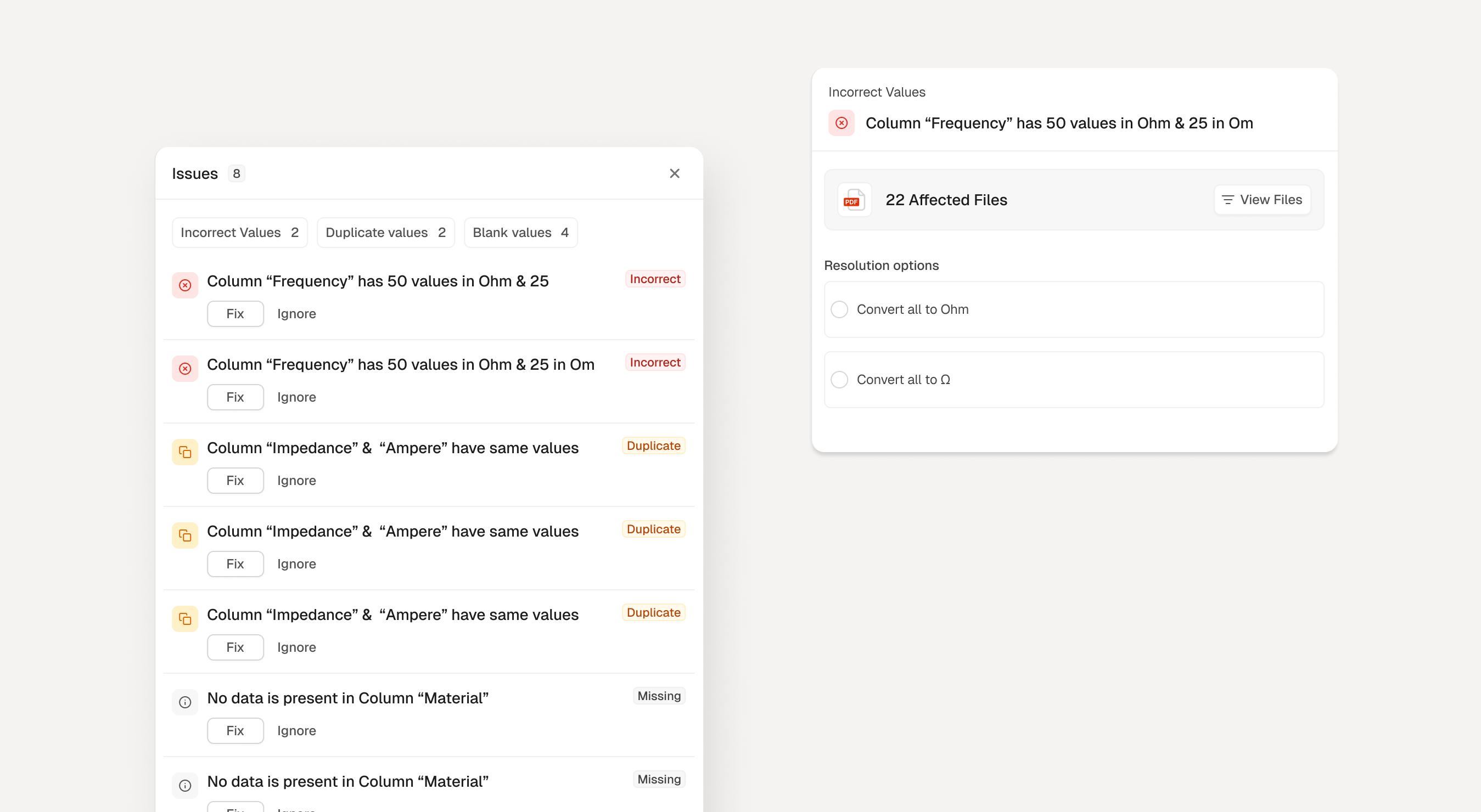
So failure got its own dedicated space. An Issues panel sorts what went wrong into Incorrect, Duplicate, and Blank, and lets you fix things one at a time or all at once. It took real effort to build a whole flow around being wrong. But how a product behaves when it fails is usually the whole ballgame.
Failure as a flow: triaged issues with single and bulk fixes.
A system that goes quiet feels broken, even when it isn't.
Processing takes time and isn't guaranteed to succeed. A brand-new user opens the product to nothing. Both moments are where products usually lose people, because silence reads as failure even when nothing has gone wrong.
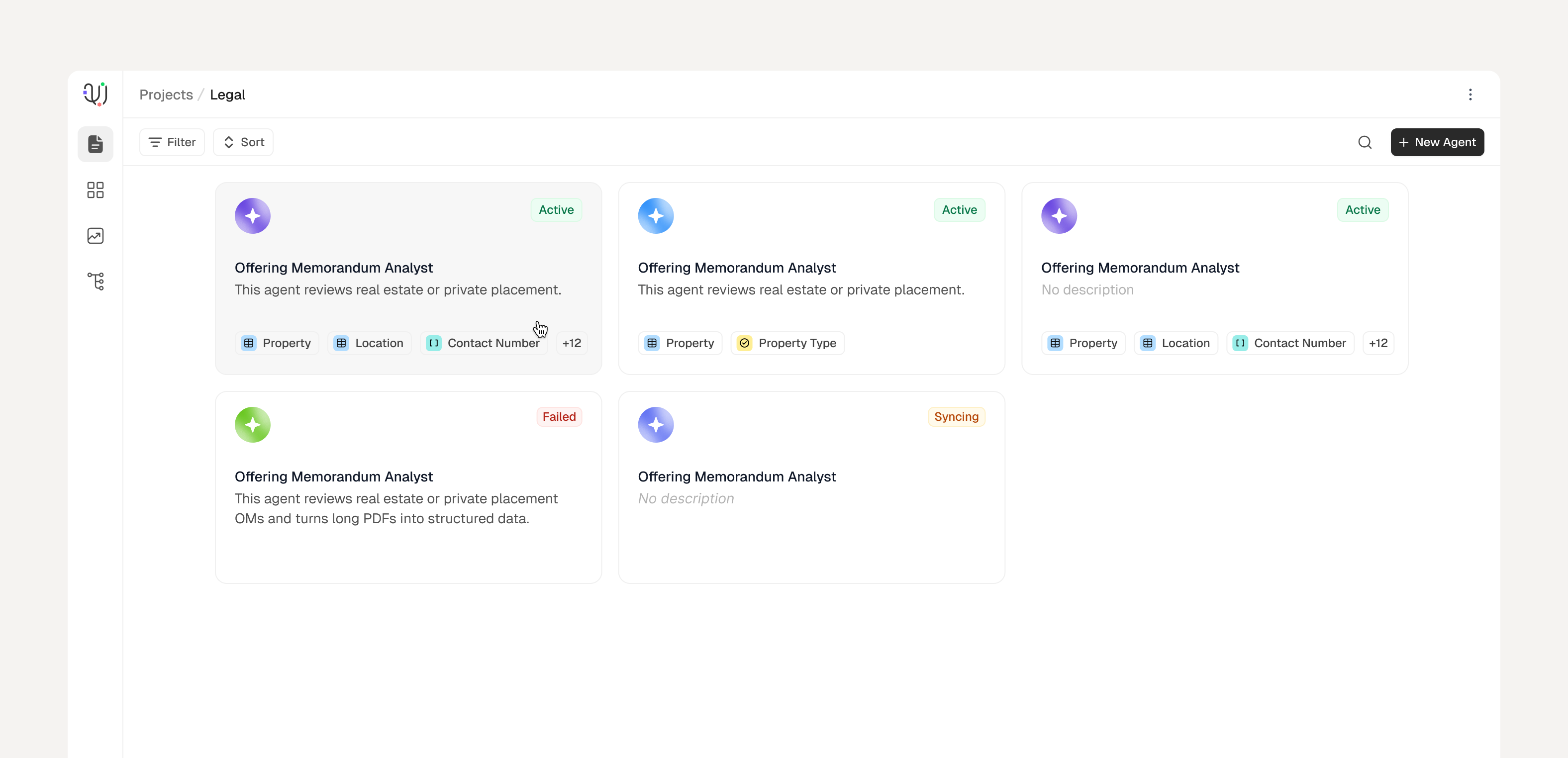
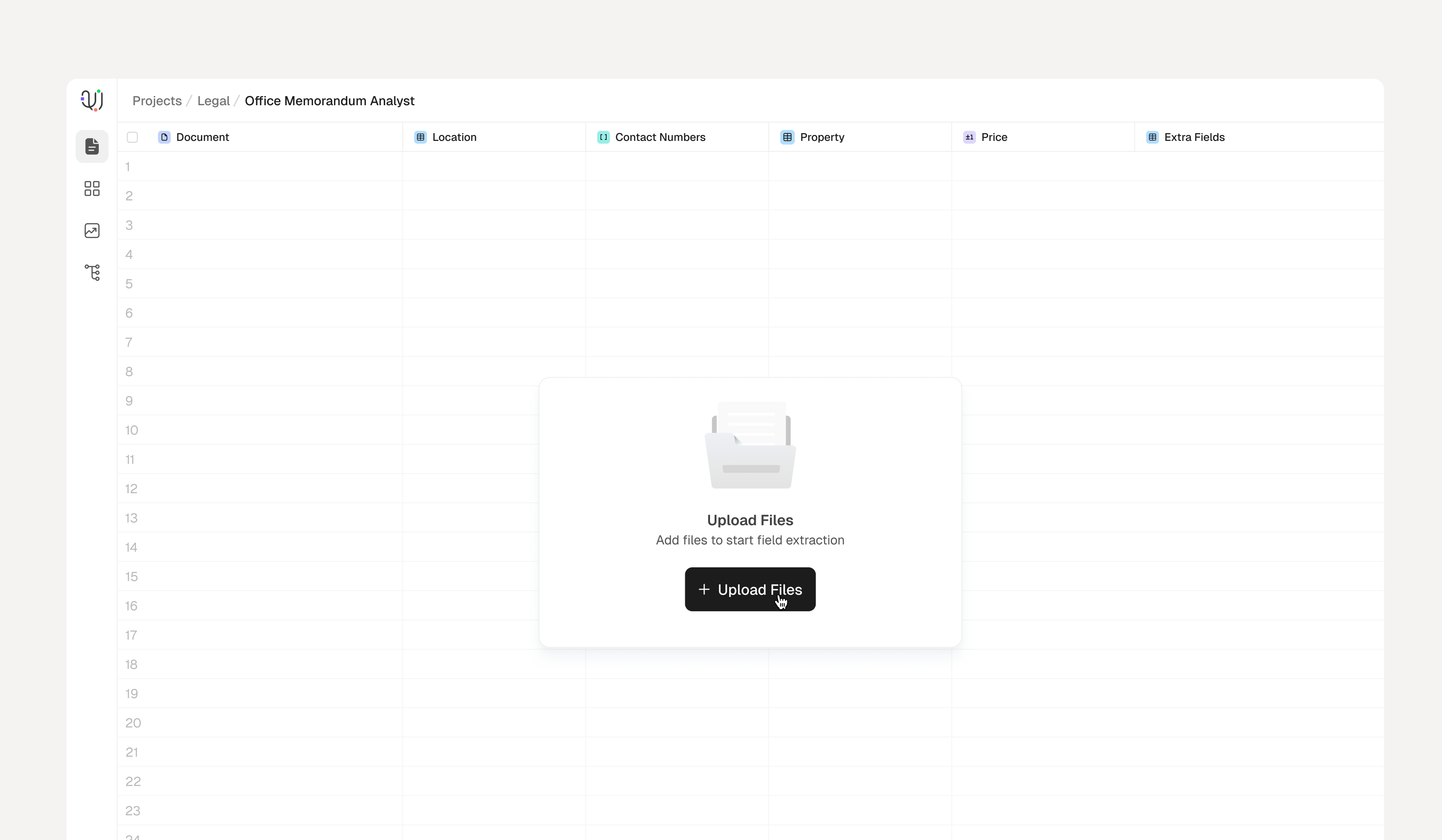
So the system never goes quiet. Every agent states plainly where it stands, Active, Syncing, or Failed. And before you've uploaded a single file, the empty screen already tells you exactly what it's going to extract.
Status is the first thing your eye lands on. The chips show what each agent extracts.An empty agent still tells you what's coming. The upload prompt is the only thing in the center.
A clean table of data doesn't convince anyone of anything.
The whole point of extraction was to unlock something downstream, not to produce a tidy spreadsheet nobody opens twice.
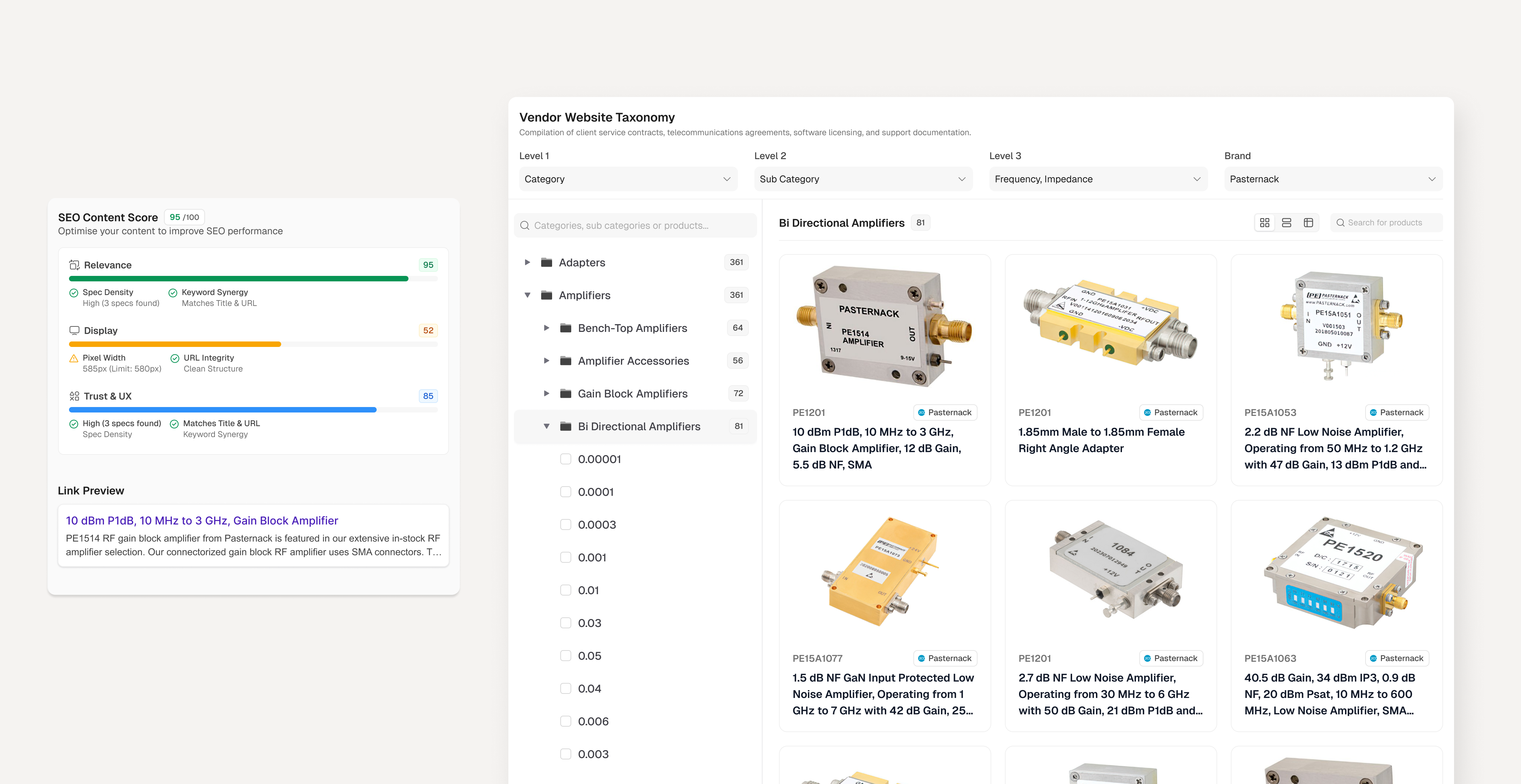
So the loop closes on screen. Extracted values flow straight into categorized listings and a live search-optimization score, so the output is the thing the business actually uses, not a staging step before real work starts.
Closing the loop: extracted data feeding taxonomy and search.
I didn't get production numbers. Here's what it was built to move.
The product wasn't handed back to me for telemetry, so I won't claim results I can't back up. What the design was built to create:
01
Less manual work
Removing a whole category of read-and-retype effort.
02
More trust
An audit trail that makes AI output defensible enough to act on.
03
Room to scale
Breaking the link between document volume and headcount.
The numbers I'd watch in production.
Trust
Acceptance rate: the share of values accepted without edits. The truest sign trust was earned.
Efficiency
Time per document against the manual baseline. Documents processed per hour.
Reliability
How often a human has to step in. Failure rate, per schema and document type.
Adoption
Time to first successful extraction. How often teams build new agents on their own.
Business
ARR generated, and how many clients the same engine gets resold into. The real test of the bet.
What I'd validate next.
If I picked this up again, three things would be at the top of my list.
Does the trust model actually change behavior? I'd watch whether people accept values faster over time, or keep re-checking. That tells me if citation-and-source was enough, or if the missing confidence signal leaves a gap.
Where does bulk resolution break? The Issues panel assumes failures cluster in fixable patterns. At real volume, I'd want to see if that holds or if edge cases pile up faster than people can triage.
Does the schema-agnostic bet survive the second client? The whole thesis is one engine, many document types. The next client's documents are the only real proof.
Trust in an AI product isn't something the model gives you. It's something the design has to earn. The model produced values. The design decided whether anyone would believe them.